
Archiving and accessibility
PDF to PDF/A: convert and check conformance
Check whether your PDFs meet the PDF/A and PDF/UA standards and convert the documents you need to archive or file to PDF/A.
What you can do with Edito PDF/A and PDF/UA
Archiving and electronic filing require files that comply with the PDF/A standard (ISO 19005), and documents published by public administrations must be accessible. Word and Google Docs often don’t produce compliant PDFs.
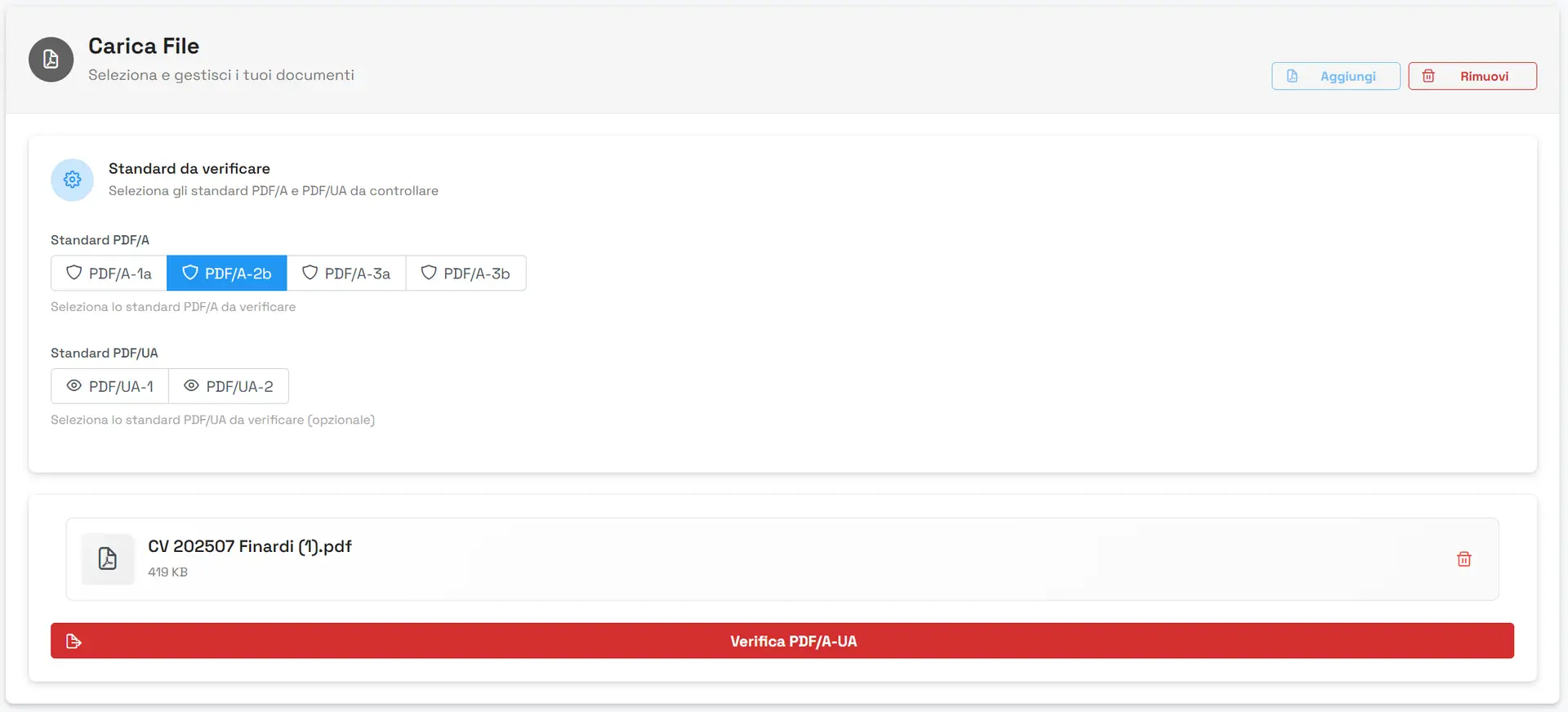
With Edito you upload your documents, choose the standards to check and get a report listing the non-conformities. If needed, you convert the file to PDF/A.
The conversion runs in the cloud, on servers in Europe: you choose the level among PDF/A-1b, PDF/A-2b and PDF/A-3b and download the converted file together with the result of the check. The check is based on veraPDF, the reference validator for the PDF/A and PDF/UA standards. Temporary files are removed within 2 hours.
Verification and conversion use no credits.
Want to convert to PDF/A on your own computer?
Edito’s check and conversion run in the cloud. To run it locally there is Edito PDF/A Converter, a Windows app that does one thing only: it converts documents to PDF/A, on your computer, in the PDF/A-1, PDF/A-2, PDF/A-2U, PDF/A-4 and PDF/A-4F levels. You try it free on your first 15 documents, from the Microsoft Store or as a direct download. Then you buy it once, with no subscription, on the Store or directly from Jugaad.

Long-term archiving (PDF/A)
The PDF/A format is designed so that a document opens and looks the way it was created, even years later. It is the format required for compliant digital preservation and for electronic filing.
Accessibility (PDF/UA)
The PDF/UA standard makes content navigable by assistive software, such as screen readers, and therefore usable by people with visual impairments too.
Detailed reports
Get the verification result straight away. If there are errors, the report shows the structure or metadata problems to fix.
What PDF/A (or PDFA) is and when you need it
PDF/A is the version of PDF built to last: the ISO 19005 standard forbids anything that could stop the file from opening in ten or twenty years, such as fonts that are not embedded, external content or scripts. That is why digital preservation, many e-filing systems and public registers ask for it.
You need it when you have to preserve a document long term, file it with a register or a court, or hand it to a public body that requires it. You will often see it written “PDFA” or “PDF-A”: it is the same format.
Convert a PDF to PDF/A in 3 steps
- Upload the document to Edito, from the web app or from PDF Editor: PDFs, Word files, images and scans.
- Choose “Convert to PDF/A” and start: the conversion runs in the cloud and uses no credits.
- Download the file and read the result: the report tells you whether the output is conformant and what, if anything, needs fixing.
The tutorials are below: under a minute each, silent, with subtitles.
PDF/A-1b, 2b, 3b and PDF/A-4: which one to choose
- PDF/A-1b (ISO 19005-1): the most widespread and the most requested. It ensures the document always looks the same. It allows neither transparency nor attachments.
- PDF/A-2b (ISO 19005-2): like the previous one, but it allows transparency, more efficient compression and lighter files. It can contain other PDF/A files.
- PDF/A-3b (ISO 19005-3): like 2b, but it can embed files of any type. It is the basis of hybrid e-invoices such as Factur-X and ZUGFeRD.
- PDF/A-4 (ISO 19005-4): the most recent version, based on PDF 2.0. The PDF/A-4F variant can embed files of any type.
The letter “b” means basic, visual conformance. The “u”, as in PDF/A-2U, additionally ensures that text can be searched and copied reliably. The “a” adds the document structure, useful for accessibility. If the portal says nothing else, PDF/A-1b is the usual choice: always check the instructions of whoever receives the file.
With Edito in cloud you convert to PDF/A-1b, PDF/A-2b and PDF/A-3b. With Edito PDF/A Converter, on your computer, you convert to PDF/A-1, PDF/A-2, PDF/A-2U, PDF/A-4 and PDF/A-4F.
Examples of use
- Annual accounts to file. Meeting minutes, notes and reports exported from Word: you convert them to PDF/A and check they are conformant before attaching them to the filing.
- A case file to send to preservation. Contracts and attachments of a closed matter: you merge them, convert them and keep a file that will still open years from now.
- A document to file with a court. You check that the PDF has selectable text, embedded fonts and no active elements before sending it.
- A resolution to publish. You check PDF/UA so that it can be read with screen readers, and PDF/A for preservation.
- Scans to archive. You run OCR, so the text can be searched, and then convert to PDF/A.
What public portals ask for in Italy, France and Germany
Every portal has its own rules, and they change over time. Here are the main references, updated to November 2026: before sending a document, always check the current instructions of the portal that receives it.
Italy
- Business register (filing of annual accounts and company documents): the accounts go in XBRL and the attachments in PDF/A (ISO 19005). The Unioncamere operating manual states that a different format is grounds for rejecting the filing (D.P.C.M. of 10 December 2008).
- Compliant digital preservation: the AgID guidelines on the creation, management and preservation of electronic documents list the accepted formats in Annex 2, “File formats and migration”, and PDF/A is among them.
- E-filing of court documents: the requirements depend on the type of proceedings and on the technical specifications in force. In general you need a PDF with selectable text, generated from the document and not from a scan, with no active elements.
France
- Chorus Pro (invoices to public bodies): it accepts the Factur-X format, that is, a PDF/A-3 that embeds the invoice data as XML.
- INPI Guichet unique (company formalities and annual accounts): it asks for PDF attachments within the size limits set by the portal. There appears to be no general PDF/A requirement.
Germany
- Elektronischer Rechtsverkehr (courts, also through beA): the ERVV regulation requires documents in PDF. The official notice of 2025 allows PDF up to version 2.0, PDF/A-1, PDF/A-2 and PDF/UA, with embedded fonts, no externally loaded content and no JavaScript.
- E-invoices: the ZUGFeRD format is a PDF/A-3 with embedded XML data; XRechnung, by contrast, is XML only.
Edito converts to PDF/A and checks conformance with PDF/A and PDF/UA. It does not generate Factur-X or ZUGFeRD invoices and does not replace the instructions of the portal.
Who we recommend it for
Essential for anyone who manages archives of compliant documents, anyone who sends documents to public administrations, and judicial bodies.

Public administrations
Publish resolutions, decisions and calls for tenders as accessible PDFs: check conformance with PDF/UA, the full standard for accessible PDFs, which helps you meet public-sector accessibility requirements (in the EU, Directive (EU) 2016/2102), and with PDF/A, the standard for long-term preservation.


Healthcare and research
Make medical reports and documents readable with screen readers too (PDF/UA) and prepare them for long-term preservation (PDF/A).


Law firms
Prepare documents for e-filing: convert to PDF/A and check the file, even when Word or Google Docs do not produce a conformant PDF. Always check the specifications of the portal.

Frequently asked questions
How can I tell whether a PDF is PDF/A?
Upload it to Edito and choose the standard to check: in a few seconds you get the result and, if the file is not conformant, a report with the structure or metadata problems to fix. Opening the file and seeing it correctly is not enough: a PDF can look identical and not be PDF/A. Edito’s check is based on veraPDF, the reference validator for conformance with the PDF/A and PDF/UA standards.
Can a PDF/A be edited?
Yes, it is a PDF in every respect. However, if you edit it with a program that does not follow the standard, it can lose conformance: after every change it is worth repeating the check or converting the file again.
How much does converting to PDF/A cost?
Check and conversion are included in the Edito plans, starting from Edito Basic at €5 a month, excl. VAT, and use no credits. You can try them for 15 days. If you only need conversion on your computer, there is the Edito PDF/A Converter app for Windows, with a trial on the first 15 documents.
Does the conversion happen on my computer?
No: Edito’s check and conversion run in the cloud, on servers in Europe, and temporary files are removed within 2 hours. To work locally use Edito PDF/A Converter, which converts on your computer without sending the document.
What is the difference between PDF/A and PDF/UA?
PDF/A (ISO 19005) is for preservation: it ensures the document opens and looks the same many years from now. PDF/UA (ISO 14289) is for making the document accessible: it structures it so that a screen reader can read it. A file can meet both standards.
Why is the PDF created with Word not conformant?
Because saving as PDF from Word and Google Docs often leaves out what the standard requires: embedded fonts, colour profiles, metadata. The file can be read, but the check rejects it. Edito converts it and tells you whether the result is conformant.